

Close Menu
    Facebook X (Twitter) Instagram
    Trending
    • The Best Black Friday Deals for Capture One Photographers
    • The New Capture One 16.7 – Three Amazing Use Cases
    • Capture One 16.7: Combine Masks, Better Retouching and More
    • Capture One 16.6.5 – Blemish Protection, Output Folder in Session Folders, Sony RX1R III
    • Top Free AI Tools for Photographers
    • Capture One AI Retouching – Everything You Need to Know
    • Capture One 16.5.6 – Grayscale Editing, iPhone DNG to EIPs, and other improvements
    • Capture One 16.5.5 Separate People Masks and Canon 16-28mm
    Facebook X (Twitter) Instagram
    Capture One Pro Tutorials, Styles, Courses, Books
    • Articles
    • Contacts
    • Styles
      • NEW! Street & Travel Styles
      • New! Layers Starter Kit
      • NextGen Landscape Styles
      • Adaptive Styles
      • NextGen Styles
      • Capture One Styles FREE
      • Ultimate Capture One Toolkit
      • Film Styles for Capture One
      • Creative Styles
      • Capture One Pro Color Grading Styles
    • TUTORIALS
      • NEW! Color Grading in Capture One
      • Capture One Expert Course
      • Capture One Hidden Features eBook
      • Capture One Best Practices
      • Capture One Shortcuts Cheat Sheet
      • Capture One Webinars
      • AI-Native Photographer Online Course
      • Practical AI Course
      • Capture One Script Generator
      • Capture One Assistant
      • AI-Powered Workflow for Photographers
    • Capture One Christmas Sale
    • FREE: 65 STYLES FOR CAPTURE ONE
    Capture One Pro Tutorials, Styles, Courses, Books
    Home»News»Capture One 16.5.5 Separate People Masks and Canon 16-28mm
    News

    Capture One 16.5.5 Separate People Masks and Canon 16-28mm

    Alexander SvetBy Alexander SvetFebruary 6, 2025Updated:February 6, 2025
    Facebook Twitter Email LinkedIn WhatsApp Reddit Tumblr
    Share
    Facebook Twitter LinkedIn Email Telegram WhatsApp

    Capture One has just released the 16.5.5 update, introduces Separate Masks in People Masking, which allows you to create a mask of each selected area ( Face Skin, Pupil and Iris, etc.) as a new layer instead of merging them all on one layer.
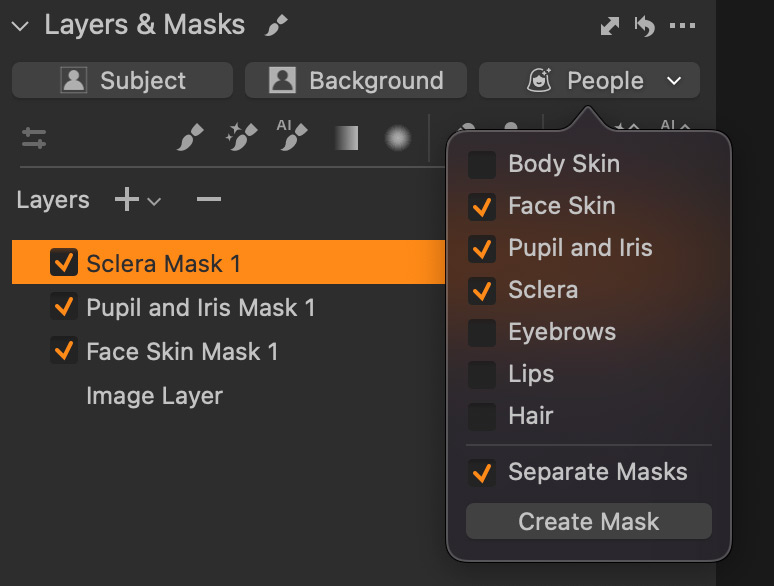
    Capture One 16.5.5 introduces Separate Masks in People Masking

    Compatibility

    • Capture One 16.5.5 is fully backward compatible with Sessions and Catalogs created in any subversion of 16.5.
    • However, documents from 16.4 or earlier will need to be upgraded for compatibility.

    New Lens Support

    • Canon RF 16-28mm F2.8 IS STM

    Bug Fixes

    General:

    • Fixed an issue where exports could slow down due to excessive GPU resource allocation.

    macOS:

    • Fixed a bug where thumbnails wouldn’t display for some files.

    System Requirements

    Minimum system requirements:

    • macOS: 13 or newer (tested on macOS 13.7.2, 14.7.2, and 15.3)
    • Windows: 10 64-bit 22H2, Windows 11 22H2 or newer (tested on Windows 10 64-bit 22H2 and Windows 11 24H2)
    • Processor: Intel Core i3 (1st gen) or AMD Jaguar Family
    • RAM: 8 GB
    • Storage: 10 GB free space
    • Display: Calibrated monitor, 1280×800 resolution, 24-bit color
    • Internet Connection: Required for Capture One Live

    Capture One AI Masks – 3 Tricks for Enhancing Eyes

    I’ve prepared a free lesson on eye enhancement using AI masks in Capture One! You’ll see how to set visual accent on eyes, how to quickly change iris color, and how to make red veins in eyes less noticeable.


    Share. Facebook Twitter Pinterest LinkedIn Tumblr Telegram Email
    Alexander Svet

    Alexander Svet – Professional photographer and photography instructor. Phase One Certified Professional and Capture One beta tester.

    Related Posts

    The Best Black Friday Deals for Capture One Photographers

    November 28, 2025

    Capture One 16.6.5 – Blemish Protection, Output Folder in Session Folders, Sony RX1R III

    September 4, 2025

    Capture One 16.5.4: Leica SL3-S, Sony a1 II, and Major Bug Fixes

    January 24, 2025

    Follow @AlexOnRAW

    Recent Posts
    • The Best Black Friday Deals for Capture One Photographers
    • The New Capture One 16.7 – Three Amazing Use Cases
    • Capture One 16.7: Combine Masks, Better Retouching and More
    • Capture One 16.6.5 – Blemish Protection, Output Folder in Session Folders, Sony RX1R III
    • Top Free AI Tools for Photographers
    Copyright 2024 Afterimages OÜ
    Reg. nr. 16195804
    Address: Estonia, Harju maakond, Tallinn, Kesklinna linnaosa, Luise tn 4-46, 10142
    Customer service email: [email protected]
    Privacy policy  Refund policy  EULA

    My Capture One Course
    Capture One Styles Free Download
    Capture One Film Styles
    Capture One Color Grading Styles
    Capture One Book
    Capture One Scritps
    Capture One AI Masking
    Capture One Black Friday

    Type above and press Enter to search. Press Esc to cancel.