


Capture One recently released an update that adds a bunch of handy features, allowing you to:
- Prevent retouching of birthmarks, moles, and other sensitive areas of the face.
- Exclude the Output folder from the Capture One library
- Automatically apply XMP crop metadata.
There are also useful additions to cloud settings, scripts, and new camera support.
Let’s explore how these new features can enhance your Capture One workflow!

First, a quick announcement!
On September 11, I’m starting a new autumn cohort of the Become an AI-Native Photographer course and the next 3 students can join with a $250 discount.
This four-week transformative course covers all aspects of an AI-powered photography workflow:
- AI Power-Skills for Photographers
- Capture One AI-Powered Tools
- Generative AI for Photographers
- AI-Driven Marketing for Photographers
Your 4-Week Transformation
Starting September 11, we’ll meet online every Thursday for four weeks for practical, hands-on sessions.
The lesson starts at 17:00 UTC, so if you’re:
- in New York it’s 1:00 PM
- in San Francisco it’s 10:00 AM
- in London it’s 6:00 PM
- in Berlin it’s 7:00 PM
You’ll learn AI tools that actually make sense for photographers – both for editing more efficiently and connecting with clients more effectively.
No fluff, just real techniques you can use immediately.
Here is what students of the first cohort are saying about the course:
Watch Sample Lesson from the Course
Learn how to automate your Capture One workflow with the newest AI tools:

Watch the Video
Final 3 Seats – Save $250
There are 3 spots left on the course with a $250 discount!

What do I get with the course?
- First, you’ll get access to 8 hours of live lessons (four two-hour sessions) and their recordings.
- Second, you will immediately receive access to my Practical AI video course. (worth $79.99)

“The Practical AI course bridges the gap between theoretical knowledge and real world application, that tackled meaningful use cases rather than examples that aren’t useful. Unlike other courses that either oversimplify or get lost in technical weeds, Practical AI struck the perfect balance while remaining accessible.”
But that’s not all, you’ll also get:
- Printable workbook with 10 ready-to-use prompt templates
- Database of 50+ AI tools for photographers
- LLM Comparison Quick-Chart
- AI workflow cheat sheets and hotkey guides
- Sample RAW pack for practice
- 12 tested prompt templates for image generation
- 10 copy formula prompts
- Website LLM-optimization checklist
- and more!
In 4 Weeks, You’ll Be Able To:
- Reduce editing time significantly while maintaining your style and standards
- Set up simple automation for routine business tasks
- Spend less time on busywork and more time creating
- Evaluate new AI tools with confidence
- Use AI to brainstorm creative concepts and plan shoots
- Use image generation in your workflow
Upon completion, receive your official AI-Native Photographer certification—a mark of your commitment to staying ahead of the curve.
Become an AI-Native Photographer
Blemish Protection
First, let’s look at the new Blemish Protection feature. With this feature, you can mark areas that won’t be affected by the Blemish Removal tool. This makes it easy to preserve birthmarks, moles, and other sensitive areas of the skin:

The Blemish Protection Brush works just like a regular brush and has most of the same settings:

You can access the new tool from the toolbar and Blemish Protection’s visibility relies on the mask’s visibility, so you can switch it on or off the same way you switch a layer mask’s visibility.

However, the new tool has a significant flaw.
Blemish Protection masks cannot be copied or saved in styles.
For me, that’s a huge issue because manually masking each face ruins the whole idea of AI editing. Still, I’m pretty sure the ability to copy the mask will be added soon.
Output Folder in Session Folders
The 16.6.5 update gives you the option to include or remove the output folder from the Session folder:
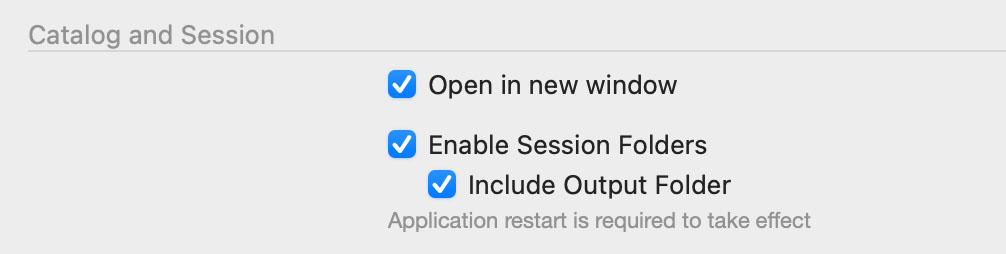
Unchecking the Include Output Folder box will keep the folder on your drive, but remove it from the Session Folders section:

It will also prevent the creation of the CaptureOne folder containing image settings and previews inside the Output folder. This can be convenient in some cases, too.
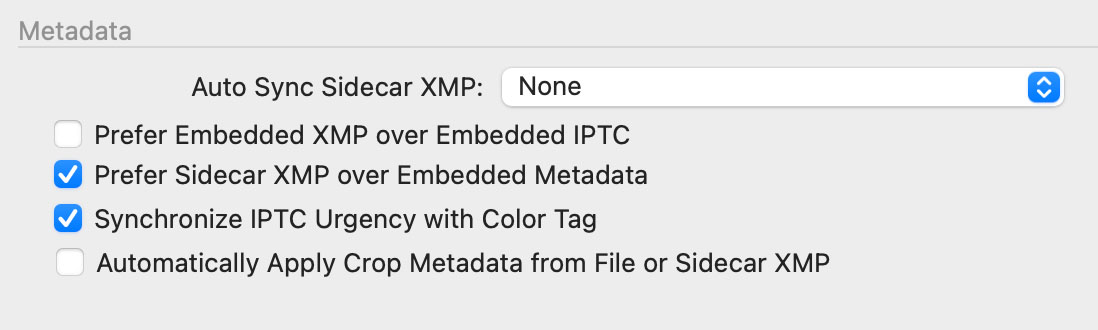
Automatically Apply XMP Crop Metadata
Another new option in the Capture One settings allows you to automatically apply crop adjustments contained in XMP files:
Normalize, Guides, and Folder Generation in Cloud Settings (All in One, Studio)
The Cloud Settings now support presets for Normalize, Guides (Studio), and Folder Generation for the All-in-One and Studio plans.
AppleScript control for Live View status and Capture Time
You can now use AppleScript to read and control the status of Live View: whether it is running, paused, or closed. This feature is available as an application-level read/write enumeration.
New Camera Support
Capture One 16.6.5 now supports wired and wireless tethering for the Sony RX1R III.
65 New Free Styles for Capture One
I’ve prepared a new set of 65 free styles for Capture One and you can download them here:
Download Free Styles
These styles have been approved by thousands of Capture One photographers worldwide, and in this video, you’ll learn how to use them to quickly find the perfect color grading for your shots and speed up your Capture One workflow:
