

Close Menu
    Facebook X (Twitter) Instagram
    Trending
    • The Best Black Friday Deals for Capture One Photographers
    • The New Capture One 16.7 – Three Amazing Use Cases
    • Capture One 16.7: Combine Masks, Better Retouching and More
    • Capture One 16.6.5 – Blemish Protection, Output Folder in Session Folders, Sony RX1R III
    • Top Free AI Tools for Photographers
    • Capture One AI Retouching – Everything You Need to Know
    • Capture One 16.5.6 – Grayscale Editing, iPhone DNG to EIPs, and other improvements
    • Capture One 16.5.5 Separate People Masks and Canon 16-28mm
    Facebook X (Twitter) Instagram
    Capture One Pro Tutorials, Styles, Courses, Books
    • Articles
    • Contacts
    • Styles
      • NEW! Street & Travel Styles
      • New! Layers Starter Kit
      • NextGen Landscape Styles
      • Adaptive Styles
      • NextGen Styles
      • Capture One Styles FREE
      • Ultimate Capture One Toolkit
      • Film Styles for Capture One
      • Creative Styles
      • Capture One Pro Color Grading Styles
    • TUTORIALS
      • Capture One Expert Course
      • Capture One Hidden Features eBook
      • Capture One Best Practices
      • Capture One Shortcuts Cheat Sheet
      • Capture One Webinars
      • AI-Native Photographer Online Course
      • Practical AI Course
      • Color Grading in Capture One
      • Capture One Script Generator
      • Capture One Assistant
      • AI-Powered Workflow for Photographers
    • Capture One Video Course
    • FREE: 65 STYLES FOR CAPTURE ONE
    Capture One Pro Tutorials, Styles, Courses, Books
    Home»Articles»Color Readouts in Capture One
    Articles

    Color Readouts in Capture One

    Alexander SvetBy Alexander SvetAugust 8, 2019
    Facebook Twitter Email LinkedIn WhatsApp Reddit Tumblr
    Share
    Facebook Twitter LinkedIn Email Telegram WhatsApp

    Are you aware of Color Readout tool in Capture One?

    You can find it in the “Pick …” tools drop-down menu (hold the left mouse button to expand it).
    With Color Readout you can add stickers on to your image. Each sticker shows color values for this particular place in the image.
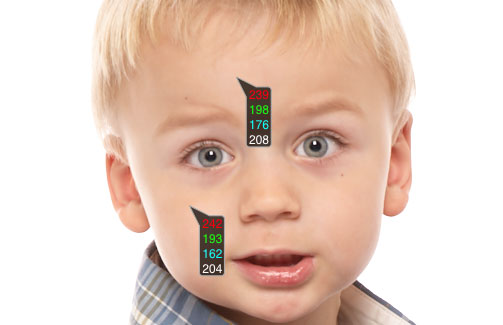
    That’s a pretty useful tool for advanced color correction.
    color
    Share. Facebook Twitter Pinterest LinkedIn Tumblr Telegram Email
    Alexander Svet

    Related Posts

    The New Capture One 16.7 – Three Amazing Use Cases

    November 7, 2025

    Capture One 16.7: Combine Masks, Better Retouching and More

    October 3, 2025

    Top Free AI Tools for Photographers

    June 20, 2025

    Follow @AlexOnRAW

    Recent Posts
    • The Best Black Friday Deals for Capture One Photographers
    • The New Capture One 16.7 – Three Amazing Use Cases
    • Capture One 16.7: Combine Masks, Better Retouching and More
    • Capture One 16.6.5 – Blemish Protection, Output Folder in Session Folders, Sony RX1R III
    • Top Free AI Tools for Photographers
    Copyright 2024 Afterimages OÜ
    Reg. nr. 16195804
    Address: Estonia, Harju maakond, Tallinn, Kesklinna linnaosa, Luise tn 4-46, 10142
    Customer service email: [email protected]
    Privacy policy  Refund policy  EULA

    My Capture One Course
    Capture One Styles Free Download
    Capture One Film Styles
    Capture One Color Grading Styles
    Capture One Book
    Capture One Scritps
    Capture One AI Masking
    Capture One Black Friday

    Type above and press Enter to search. Press Esc to cancel.